Archive for: August 2012

Join Me @ Apple Learning Tour – Upper Grand DSB System Leaders Conference

Sorry for the late notice, but if you’re from the Upper Grand District School Board, come on by to say “hi” at the secondary mathematics iPad session… Looking forward to delivering my first Apple Learning Tour session!

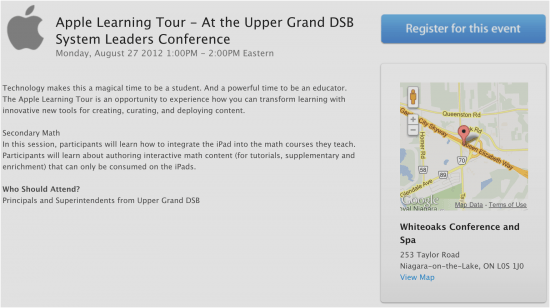
Apple Learning Tour | Upper Grand District School Board UGDSB | Secondary Mathematics iPad Session

Apple Learning Tour Session Descriptor:

At the Upper Grand DSB System Leaders Conference

Monday, August 27 2012 1:00PM – 2:00PM Eastern

Technology makes this a magical time to be a student. And a powerful time to be an educator. The Apple Learning Tour is an opportunity to experience how you can transform learning with innovative new tools for creating, curating, and deploying content.

Secondary Math

In this session, participants will learn how to integrate the iPad into the math courses they teach.
Participants will learn about authoring interactive math content (for tutorials, supplementary and enrichment) that can only be consumed on the iPads.

Who Should Attend?

Principals and Superintendents from Upper Grand DSB


Hopefully you can make it out! If you do, be sure to stop and say “hi!”

Kyle Pearce

About Kyle Pearce

Secondary Math Teacher and Intermediate Math Coach with the Greater Essex County District School Board leading a Ministry funded 1:1 iPad project called Tap Into Teen Minds. I currently teach at Tecumseh Vista Academy K-12 in the morning and focus on duties for the Middle Years Collaborative Inquiry (MYCI) Project in the afternoon.

Mac OS Upgrade Mountain Lion – A Classroom Must!

Mac OS X Mountain Lion Provides Great Improvements

iTunes, App Store, iBookstore, and Mac App StoreWhile the brand new Apple Mac OS upgrade to Lion called Mountain Lion provides more than 200 features, I purchased the new Mac OS upgrade the day it was released to allow my MacBook Pro to catch up to all of the great features I already enjoy on my iPhone 4. Notifications, Reminders, Built-in Sharing, and Screen Mirroring with Apple TV were the huge selling features for me. Maybe you’ll be sold when you see some of these great features which will make teaching so much easier and organized!

Mac OS X Mountain Lion Notification Features

Apple Mac OS X Mountain Lion Upgrade Notification Centre

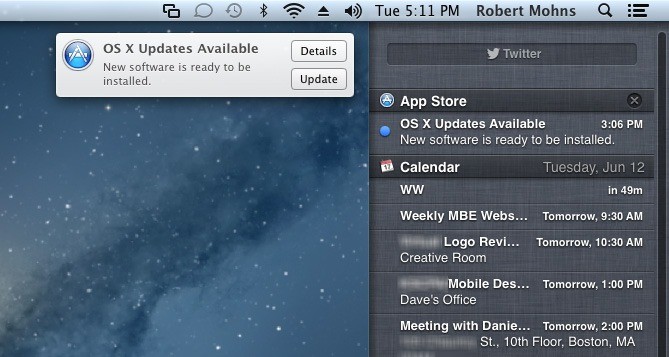
One of the best Mac OS Upgrades featured in Mountain Lion is the notifications and notification centre. Mac OS Upgrade Mountain Lion - Reminders App & NotificationsIn the top right corner of your Mountain Lion Mac OS X Upgrade, you’ll notice an icon with three dots and three lines. Clicking on this will open your Notification Centre which shows you your Tweets, new emails, reminders, calendar events, and even allows you to post Tweets to all of your Twitter accounts!


iTunes, App Store, iBookstore, and Mac App Store

Mac OS X Mountain Lion Now Has Reminders App

One of the simple features which I am geeked about is the addition of the Reminders App. I use Reminders on my iPhone 4 constantly to keep my daily tasks and lists organized from home, work, and play. My iPhone Reminders are now synced on my laptop through iCloud and I no longer need to worry about which device I’m using when I want to input a new entry!

Notes Are Pushed to All Your Devices With Mac OS X Mountain Lion

iTunes, App Store, iBookstore, and Mac App StorePrior to the Mountain Lion update, I always felt that the Notes app on my iPhone was pretty useless. Now with iCloud syncing notes from your MacBook Pro to your iPhone makes the app much more beneficial. I am now constantly jotting down notes from presentations, interviews with parents, and much more with access to them from anywhere! Easy to manage and file away if you feel the information is deemed a long-term keeper. Double-click to pin a note to your desktop for easy-access!

Mountain Lion Built-In Sharing

From almost any app, you can now share on Facebook, Twitter, Email, Messages, and more! With a single sign-in, staying social was never easier on any device than with Mac OS X Mountain Lion! Once you’ve finished downloading your upgrade, come back to my page and tweet it to the world!

Apple TV Screen Mirroring to Your TV or Projector

Using Apple TV (ATV), you can now easily mirror your screen to a TV or LCD Projector in the classroom. Eliminate cords from your computer to the projector in your presentation and instantly become able to present from anywhere in your class! Why not bring your MacBook Pro to the front of the room and instruct from there? Bring it to a group of students to allow them to use the computer and display their work to the rest of the class. Just as Apple TV allows iPads to be mirrored to the screen for all to see, your class set of MacBooks or iMacs can now do the same. Think of how great it would be if students in a computer lab or iPad lab could share their work instantly with the rest of the group? Collaboration at its’ finest!


iTunes, App Store, iBookstore, and Mac App Store

Kyle Pearce

About Kyle Pearce

Secondary Math Teacher and Intermediate Math Coach with the Greater Essex County District School Board leading a Ministry funded 1:1 iPad project called Tap Into Teen Minds. I currently teach at Tecumseh Vista Academy K-12 in the morning and focus on duties for the Middle Years Collaborative Inquiry (MYCI) Project in the afternoon.